Best Way to Get Internet in Chiang Mai: Thai SIM Card vs eSIM (2026 Guide)
 チェンマイ坂田
Your first trip to Chiang Mai is exciting, and a little scary too. Getting mobile internet is one of the most important things to prepare, because you need maps, translation and messages from the moment you land.
This guide explains the best ways to get internet in Chiang Mai (Thailand) in simple steps, so you can choose the one that fits your trip.
Short answer: A Thai SIM card or an eSIM is best for most travelers. I often use a Thai SIM, but eSIM is now cheaper and easier for many people.
How to get internet in Chiang Mai: 4 options
You can use any of these four ways. Each has good and bad points, so choose by your trip length and your phone.
- Buy a Thai prepaid SIM card after you arrive
- Use a travel eSIM (needs an eSIM phone)
- Use international roaming from your home mobile company
- Rent a pocket Wi-Fi router before you leave home
| Option | Cost | Ease | My view |
|---|---|---|---|
| Thai SIM card | Low (about 300–500 THB for 5–8 days of data) | Buy at the airport or 7-Eleven | Recommended |
| eSIM | Often lowest | Set up before you fly | Recommended |
| Home carrier roaming | High, unless your plan includes free roaming | Easiest | Only for very short trips |
| Pocket Wi-Fi rental | High | Extra device to carry | Not recommended |
1. Buy a Thai prepaid SIM card
My personal favorite is to buy a Thai prepaid SIM card after you land. Chiang Mai Airport has counters of the main mobile companies, AIS and TrueMove. You can buy a tourist SIM right after immigration.
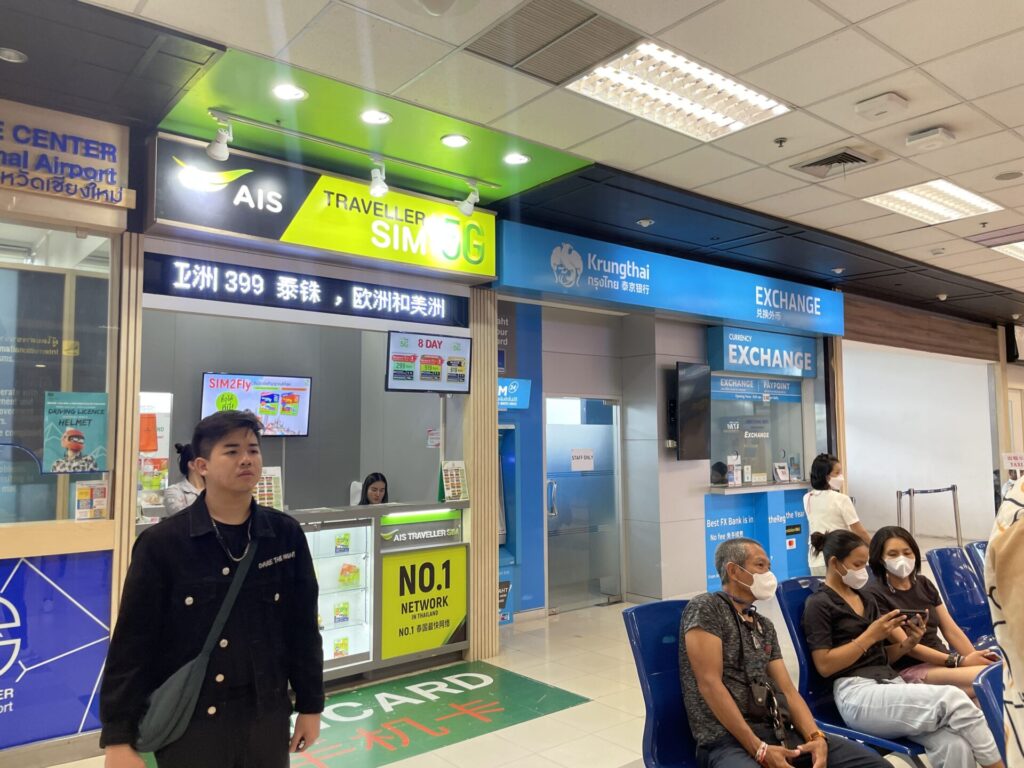
You can also buy tourist SIMs at convenience stores such as 7-Eleven in the city. The staff can help you buy and activate the SIM, so it feels safe even if it is your first time.
For example, the tourist SIM from AIS is reasonably priced. A data plan for 5–8 days costs about 300–500 THB.
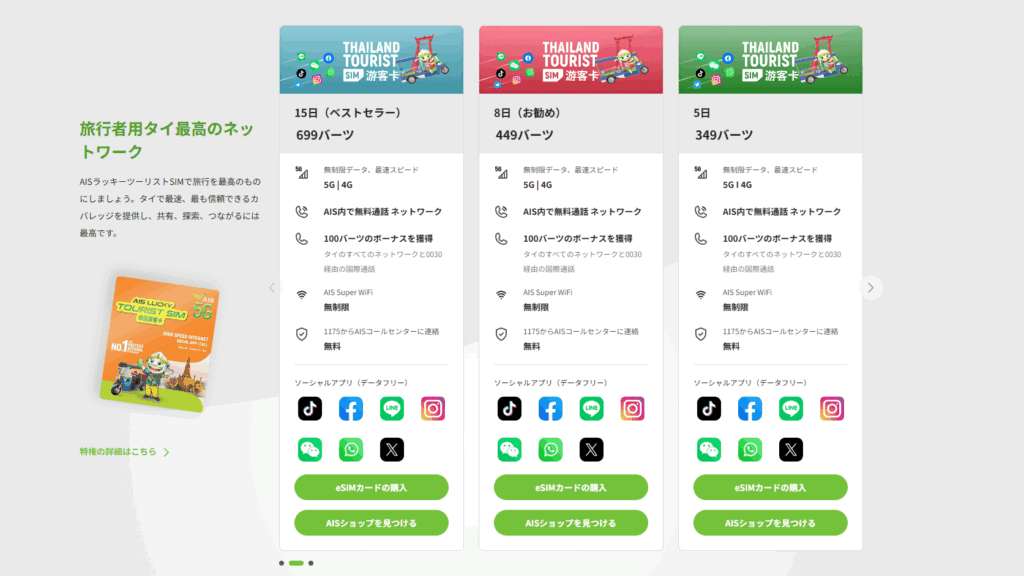
I recommend AIS or TrueMove. In cities the signal is wide and the speed is 4G/5G, so maps and social media run smoothly.
It is easy to use: put the SIM in an unlocked phone and set the APN (it is automatic in most cases). You are online right away. Keep these points in mind:
- Unlocked phone: Your phone must be SIM-unlocked. If you bought it from a mobile company in your country, ask them to unlock it before you travel.
- New phone number: The SIM gives you a Thai number. You will not receive SMS sent to your home number, so be careful with apps that need SMS codes (two-step login).
- Leftover credit: You normally throw the SIM away after the trip. Any leftover data or credit is lost, but the cost is low, so just let it go.
2. Buy an eSIM before your trip
eSIM is now very popular. You buy it online before you leave, so you do not need to swap a physical SIM.
If your phone supports eSIM, you only scan the QR code you receive and add a local data plan. Thai mobile companies sell tourist eSIM plans, and you can also book them from home through sites like Klook and KKday.
For example, if you buy an eSIM on Klook in advance, you only switch it on after you land in Thailand and you are online at once.
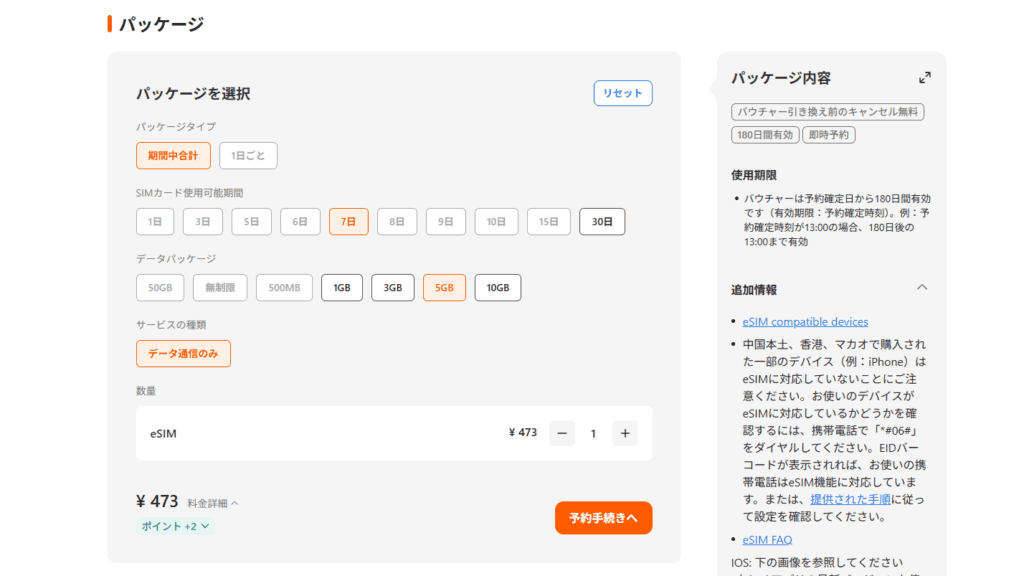
eSIM is often cheaper than a local SIM. When I compared it with the SIM I bought locally, the eSIM cost about one-third to one-half.
eSIM is a good choice if you are on a short trip and do not want to waste time, or if you are nervous about changing SIM cards.
Klook.comCheck first: Your phone must support eSIM. In rare cases, a phone bought in another country does not work well with a Thai eSIM.
So check the list of supported phones when you buy, and read the setup guide before your trip. Setup itself is simple: scan the QR code, add the profile, then turn on the line when you arrive.
3. International roaming from your home carrier
If you want to keep using your phone just as it is, you can use international roaming from the mobile company you already use.
Many big carriers sell daily roaming packs. The problem is that the price is high. For example, big carriers in Japan charge about 1,980–2,980 yen (roughly 450–650 THB) per day. In 5 days that is more than 10,000 yen, many times the cost of a Thai SIM. It is not practical for long trips or for people who use a lot of data.
But roaming can work for very short trips or very light use. Some carriers include free data abroad. For example, Rakuten Mobile in Japan gives 2 GB of free high-speed data per month in roaming, and you can add more for a fee. For email and maps only, you may pay nothing extra. For a short business trip or a few days of sightseeing, you can skip the local SIM.
Tip: Before you leave, turn roaming on in your carrier app or website. After you land, turn off airplane mode, and your phone connects to a Thai partner network by itself. To avoid a very large bill, always use a fixed-price pack or a spending limit.
4. Rent a pocket Wi-Fi router at home
The last way is to rent a pocket Wi-Fi router in your home country and carry it to Thailand.
It may look easy, because you can pick it up at the airport and do not change any phone settings. But I do not recommend it, for these reasons:
- High cost: Rental often costs about 500–1,000 yen (about 120–230 THB) per day in Japan, and the longer you rent, the more you pay.
- Extra thing to carry: You must carry the router all the time, which adds to your bags.
- Speed and stability: Depending on the device, the connection may be weak or slow.
Unless you have a special reason, a pocket Wi-Fi is “more luggage and more cost.” Options 1 to 3 above are smarter.
Summary
- Choose by your needs. For lots of cheap data, use a Thai SIM or eSIM.
- For a short, easy trip, roaming from your home carrier may be enough.
- A pocket Wi-Fi rental is not recommended.
Frequently asked questions
What is the best SIM card for Chiang Mai?
AIS and TrueMove tourist SIMs are the best choice. Both are sold at Chiang Mai Airport and at 7-Eleven in the city.
How much is a Thai tourist SIM card?
A data plan for 5–8 days is about 300–500 THB at AIS.
Is an eSIM or a physical SIM better in Thailand?
eSIM is easy and often cheaper, but your phone must support eSIM. A physical SIM works with any unlocked phone and is easy to buy at the airport.
Can I use my home phone number in Thailand?
With roaming or with a second eSIM line, yes. With a Thai SIM in the main slot, you get a Thai number, so you may not receive SMS sent to your home number.
Prices and plans change, so please check the latest details on the shop or provider website.
When your internet is ready, enjoy temples, night markets and the nature around Chiang Mai. Have a safe and happy trip!
After you get online: village tours from Chiang Mai
Once you are online, make the most of your time in Chiang Mai. ManiTabi is a small local team here. We began by visiting hill-tribe villages, and we still do. Here are three village tours you can join from the city.
 Karen village · about 1.5 hours from the cityKaren Village Life in NatureDay trip (about 9–10 hours) or 2 days / 1 night
Day trip from 4,000 THB per personSee the tour →
 Tai Lue village · near Chiang MaiLife in a Tai Lue VillageHalf day (8:15 AM – 1:45 PM)
From 3,300 THB per person (min. 4)See the tour →
 Karen village · LamphunKaren Silver Jewelry MakingDay trip (about 12 hours)
From 4,900 THB per personSee the tour →
Want to stay overnight in a village? See all our tours or the inquiry form.
Ask or book on WhatsAppJust send "village tour" — questions are welcomeTell us your dates and group size. Questions only are perfectly fine.